on this page
A domain controller can log thousands of Event ID 4624 records an hour, and nearly all of them are harmless. Somewhere in that volume is the one logon where an attacker used stolen credentials to move from a compromised laptop to a file server. On their own, the two events can look almost the same. What separates them is a small number of fields, read in the right order.
This guide is a quick reference for the logon types analysts confuse most often, with a triage order you can share with junior teammates. It assumes you already know what 4624 is and where to find it.
The short version
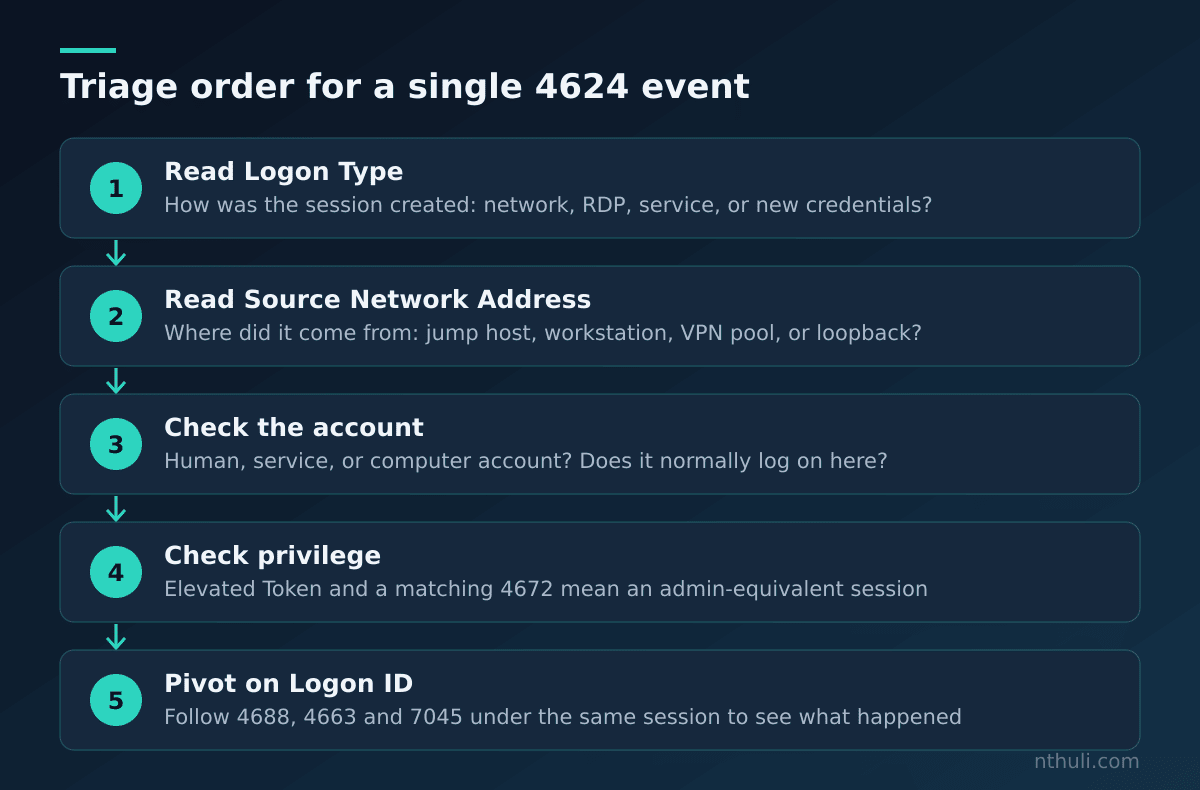
Logon Type tells you how a session was created. It doesn’t tell you where it came from, and you need both answers before you can call something lateral movement.
The field to read right after Logon Type is Source Network Address (IpAddress). On its own, a type 3 or type 10 logon proves nothing. A type 3 logon from one ordinary workstation to another, using an admin account, is the pattern you’re looking for.
Every logon type, decoded
These are the values you’ll see in the Logon Type field. Learn types 3, 9 and 10 thoroughly. They cause the most misreads.
| Type | Name | What actually triggered it | Analyst note |
|---|---|---|---|
| 2 | Interactive | Keyboard at the console, or runas without /netonly |
Expected on workstations; unusual on servers nobody visits in person |
| 3 | Network | SMB share access, remote service control, WMI, WinRM, RPC | The noisiest type. Context is everything |
| 4 | Batch | Scheduled task running under stored credentials | New task accounts deserve a look |
| 5 | Service | Service Control Manager starting a service as an account | A new service account here can mean persistence |
| 7 | Unlock | Workstation unlocked, or an RDP session reconnected | Mostly noise |
| 8 | NetworkCleartext | Credentials sent in cleartext, e.g. IIS Basic auth | The password crossed the network in recoverable form |
| 9 | NewCredentials | runas /netonly or a token built with alternate credentials |
Local actions use the original identity; network actions use the new credentials |
| 10 | RemoteInteractive | RDP / Remote Desktop Services session | A full desktop on the target |
| 11 | CachedInteractive | Domain logon using cached credentials, no DC reachable | Common for laptops off the network |
Types 12 and 13 (cached remote interactive and cached unlock) also exist, but you’ll see them much less often.
Type 3 vs type 10: the mix-up that matters
Juniors often treat type 10 as “the remote one” and type 3 as “something local”. In fact both are remote. The difference is what the remote user ends up with on the target.
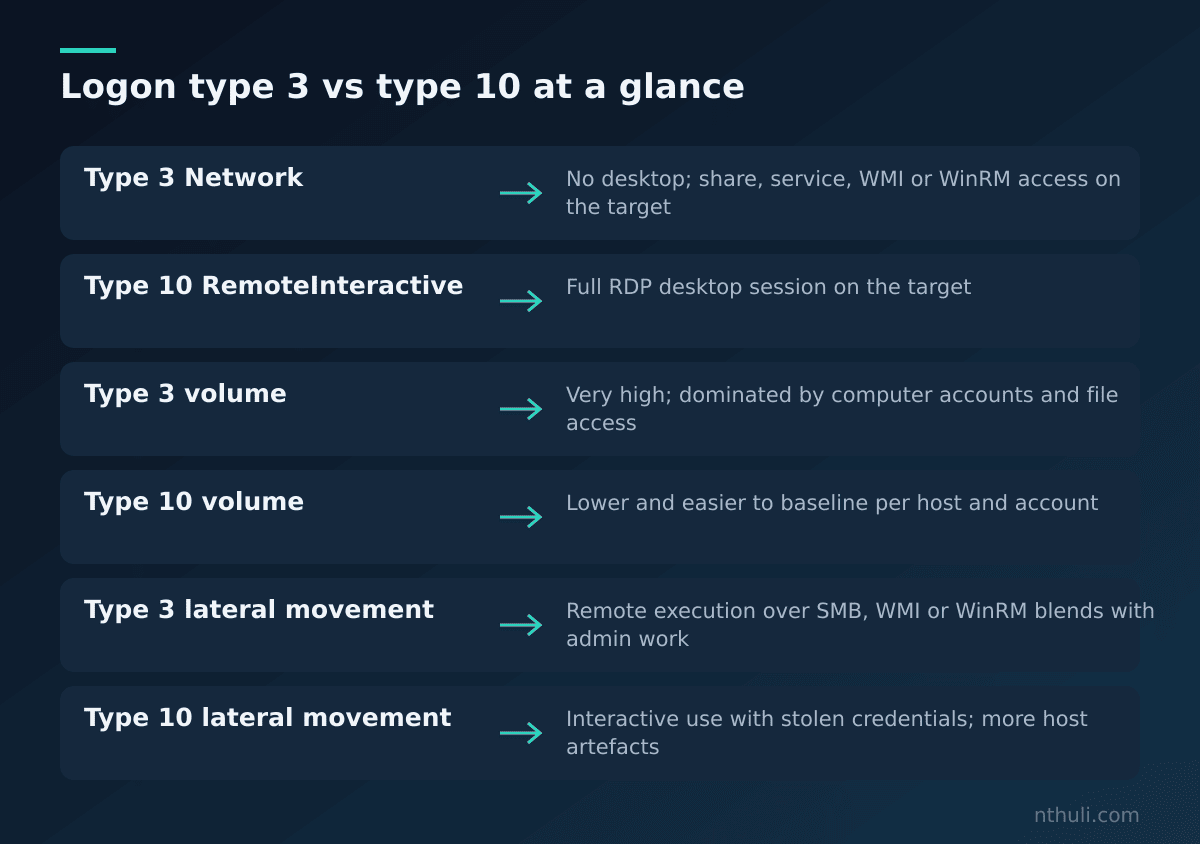
A type 3 logon gives the caller a network session: access to a share, a service call or a WMI query. No desktop is created. Most tools that run commands remotely over SMB, WMI or WinRM produce type 3 logons on the target. A lot of lateral movement therefore looks exactly like an admin doing routine work.
A type 10 logon is a full interactive desktop over RDP. It’s less frequent and easier to baseline, and the attacker usually leaves more evidence on the host.
Why an RDP logon can also produce a type 3
When Network Level Authentication is on, the client authenticates through CredSSP before the desktop session is built. On the target this often shows up as a type 3 logon followed by a type 10 for the same user and source address. Don’t count them as two separate intrusions, and don’t throw the type 3 away. It confirms the authentication path.
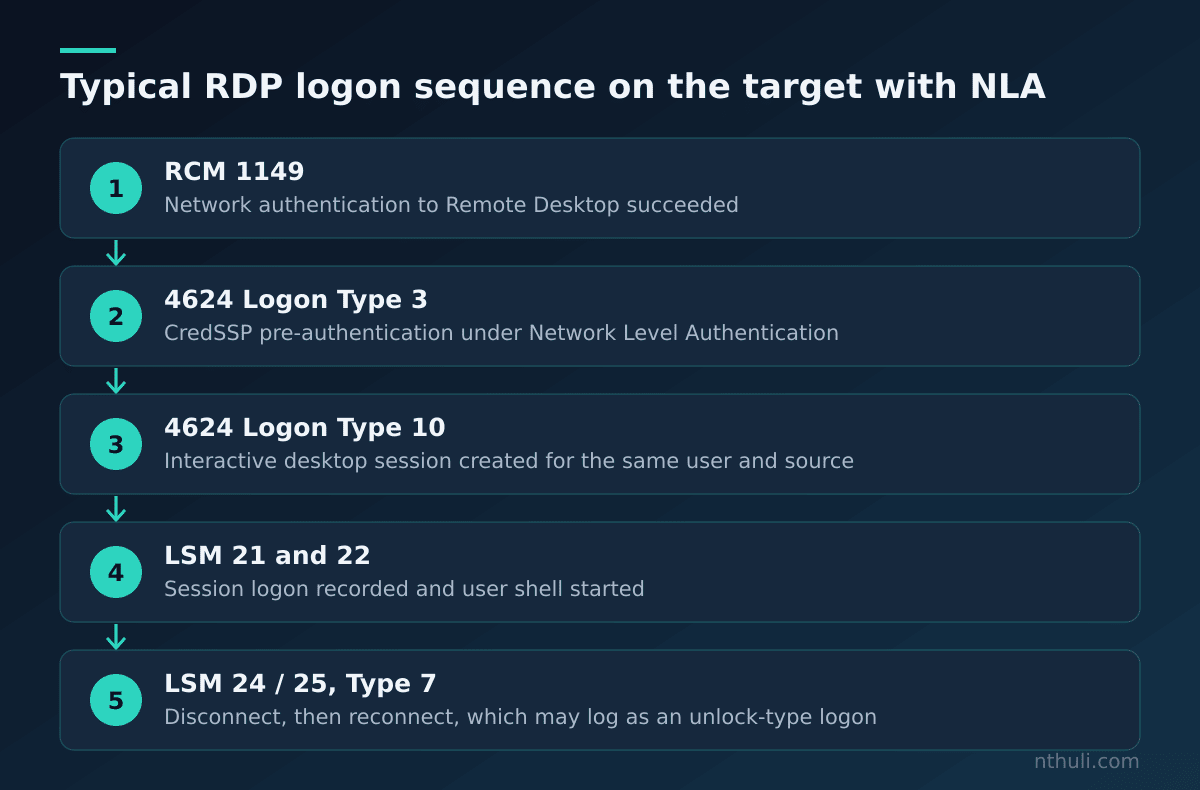
The Terminal Services operational logs fill in what 4624 leaves out:
- RemoteConnectionManager 1149: network authentication to RDP succeeded (the name is misleading; it isn’t a full logon)
- LocalSessionManager 21 / 22: session logon and shell start
- LocalSessionManager 24 / 25: disconnect and reconnect
A reconnect can be logged as type 7 rather than a new type 10, so if you’re hunting RDP only by type 10 you’ll miss resumed sessions.
The fields that do the real work
Logon Type and Source Network Address get you started. The other fields tell you how much to trust what you’re looking at.
| Field | What it tells you | Watch for |
|---|---|---|
| Source Network Address | Where the session originated | Workstation-to-workstation, VPN pools hitting servers, 127.0.0.1 / ::1 (local) |
| Workstation Name | Client hostname supplied in NTLM | Often empty with Kerberos; can be spoofed, so treat it as a hint and not proof |
| Logon Process | Component that handled the logon | NtLmSsp, Kerberos, User32, Advapi, seclogo |
| Authentication Package | NTLM, Kerberos or Negotiate | NTLM in an environment you believed was Kerberos-only |
| Package Name (NTLM only) | NTLM V1 vs V2 | Any NTLM V1 is worth fixing on its own |
| Key Length | Session key length for NTLM | 0 on NTLM network logons is a known pass-the-hash trait, but legitimate cases exist too |
| Elevated Token | Whether the token is elevated | Yes on type 3 from a non-admin workstation |
| Linked Logon ID | Pairs the split tokens of a UAC admin | Use it to join the two 4624s for one admin logon |
| Restricted Admin Mode | RDP Restricted Admin used (type 10) | Unexpected Yes where nobody has deployed the feature |
| Logon ID | Session identifier | Pivot to 4672, 4688, 4663 and 4634 with the same ID |
Two habits are worth building:
- Always pivot on Logon ID. A logon by itself only shows that someone got in. The 4688 process creations and 4663 object accesses under the same Logon ID show what they did with that access.
- Check for a 4672 next to the 4624. Special privileges assigned at logon means an admin-equivalent session. Admin type 3 logons from unexpected sources should rank above almost everything else in the queue.
Type 9 deserves its own section
NewCredentials confuses even experienced analysts. The 4624 on the local machine lists the original user as both Subject and New Logon, because local actions keep the original identity. The alternate credentials are used only when the session reaches out over the network, so they don’t appear in this event.
Type 9 with Logon Process seclogo is what runas /netonly produces. Several credential-theft tools produce the same pattern when they inject a stolen hash into a new process, which is why type 9 + seclogo is a widely used pass-the-hash hunting lead. Admins do use /netonly legitimately, so baseline who runs it and from which hosts.
To see which credentials were actually used, look for 4648 (explicit credentials) on the source host. Then match it to the type 3 logon on whichever target the session reached.
Telling routine from lateral movement
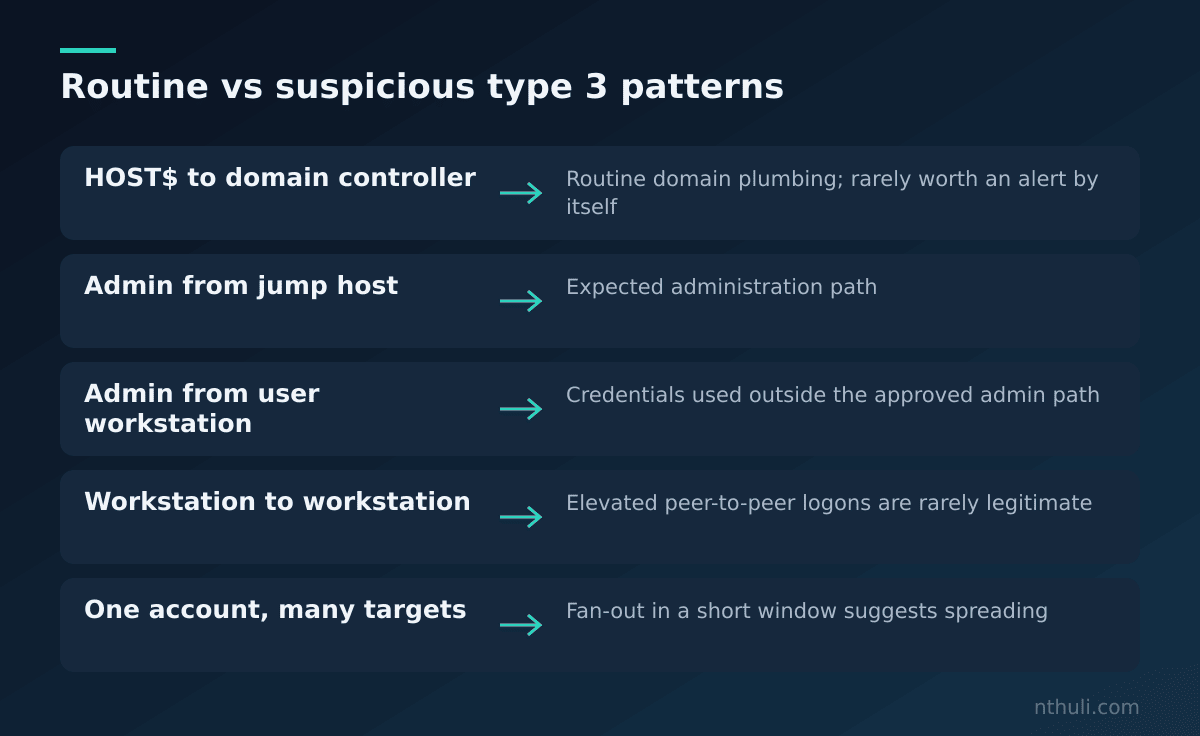
Most type 3 traffic is computer accounts, file shares and management tooling. Learn what normal looks like, so the exceptions stand out.
| Pattern | Usually | Escalate when |
|---|---|---|
Computer account (HOST$) type 3 to a DC |
Group Policy, Kerberos, domain plumbing | Never on its own |
ANONYMOUS LOGON type 3 |
Legacy null sessions, browser services | It suddenly appears on hosts that never had it |
| User type 3 to a file server | Mapped drives | The same user reaches many servers in a short window |
| Admin type 3 from a jump host | Normal administration | The source is a regular user workstation instead |
| Workstation-to-workstation type 3 with elevation | Rarely legitimate | Almost always worth a look |
| Type 10 from an internal IP | Helpdesk or admin RDP | Account has never used RDP on that host, or session runs off-hours |
| Type 10 from a public or VPN-pool IP to a server | Depends on policy | Direct exposure you didn’t know about |
A starting hunt
The query below is written for the Sentinel SecurityEvent table. It finds elevated-looking network and RDP logons where the source isn’t on your approved admin source list. Treat it as a baseline to tune, not a finished detection.
let AdminSources = dynamic(["10.10.5.10", "10.10.5.11"]); // jump hosts
SecurityEvent
| where EventID == 4624
| where LogonType in (3, 10)
| where Account !endswith "$"
| where Account !contains "ANONYMOUS LOGON"
| where isnotempty(IpAddress) and IpAddress !in ("-", "127.0.0.1", "::1")
| where IpAddress !in (AdminSources)
| summarize Targets = dcount(Computer), TargetList = make_set(Computer, 20),
            Types = make_set(LogonType), Packages = make_set(AuthenticationPackageName)
          by Account, IpAddress, bin(TimeGenerated, 1h)
| where Targets >= 3
| order by Targets desc
Tuning notes:
- Replace the jump host list with your own management subnets, and keep it in a watchlist instead of hardcoding it.
- Set the
Targetsthreshold from your baseline, not from this example. - Join on 4672 to keep only privileged sessions when the volume is too high.
Correlating across hosts
A single host only shows part of the movement. The full chain spans the source, the domain controller and the target.
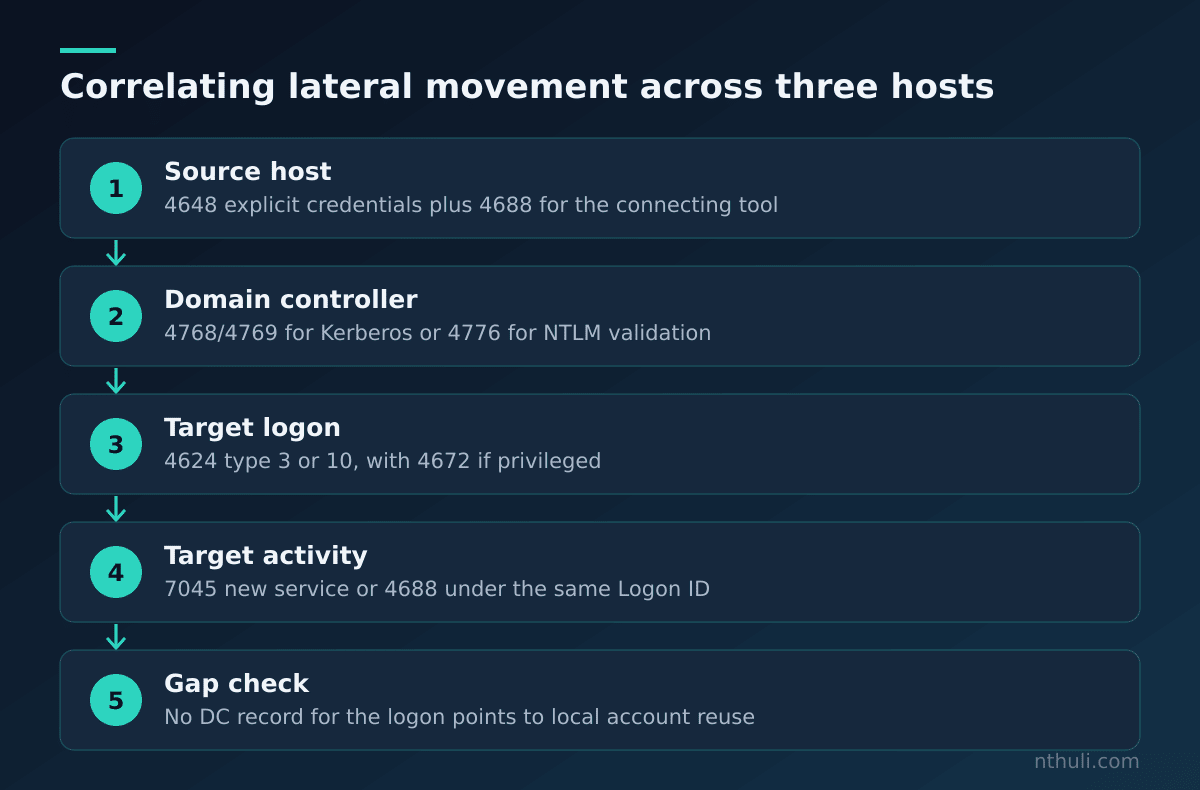
- Source: 4648 when explicit credentials were used, plus process creation for the tool that made the connection
- DC: 4768/4769 for Kerberos tickets, or 4776 for NTLM validation
- Target: 4624 type 3 or 10, 4672 if privileged, then 7045 (new service) or 4688 under the same Logon ID
If a target shows a 4624 but the DC has no matching authentication record, look at local accounts. Lateral movement with a shared local administrator password is authenticated by the target itself and leaves nothing on the domain controller.
What to learn from this
- Logon Type tells you how a session was created; Source Network Address tells you where it came from. Read both before you decide anything, and give the most weight to elevated type 3 logons between ordinary workstations.
- One RDP logon can produce several events. Expect a type 3 then a type 10 under NLA, and type 7 on reconnect. Hunting on type 10 alone misses part of the activity.
- Type 9 with
seclogoshould be baselined. It’s legitimaterunas /netonlybehaviour and also a classic pass-the-hash pattern, and you only see the alternate credentials in 4648 on the source. - Pivot on Logon ID every time. The 4624 shows that someone got in. The 4672, 4688 and 7045 events under the same session show what they did.
- Correlate across three hosts. Source, DC and target together tell the story. If the DC has no record, suspect local account reuse.